Home service automation: efficiency, growth, and clarity
Home service automation: efficiency, growth, and clarity ! Home service owner manages automation on laptop Many home service business owners assume automation belongs to big corporations with dedicated IT departments and deep pockets.
Many home service business owners assume automation belongs to big corporations with dedicated IT departments and deep pockets. That assumption is costing you real money every single day. Whether you run an HVAC company, a landscaping crew, an electrical contractor, or a construction operation, automation is not some futuristic concept reserved for Silicon Valley. It is a practical, affordable set of tools that cuts wasted hours, reduces costly errors, and makes your customers feel like they are your top priority. This guide breaks down exactly what home service automation means, what it looks like in practice, and how you can start using it to grow your business.
Key Takeaways
| Point | Details |
|---|---|
| Automation defined simply | Home service automation uses technology to streamline scheduling, billing, and customer communication for greater efficiency. |
| Biggest business benefits | Automation reduces administrative errors, saves time, and enhances the client experience. |
| Start small for best results | Automating one process at a time builds momentum and maximizes long-term return on investment. |
| Easy to use tools | User-friendly automation solutions are available for businesses of all technical backgrounds. |
What is home service automation?
With the misconception out of the way, let's define exactly what home service automation means for businesses like yours.
At its core, home service automation uses technology to streamline scheduling, dispatching, invoicing, and customer communications. Think of it less like installing robots on your job site and more like building a reliable system that handles routine tasks without requiring your personal attention every single time. It is process optimization applied to the specific challenges of a field service business.
"Automation in home services is not about replacing human judgment. It is about freeing your team to apply that judgment where it actually matters."
The most common areas where automation delivers immediate value include:
- Scheduling and appointment booking: Customers can book online, and your calendar updates automatically without a phone call.
- Dispatch and routing: Systems assign the right technician to the right job based on location, availability, and skill set.
- Estimates and invoicing: Quotes get generated and sent digitally, and invoices follow job completion without manual data entry.
- Appointment reminders: Automated texts and emails go out before every job, slashing no-show rates.
- Customer follow-ups: Review requests, satisfaction surveys, and rebooking prompts happen on their own schedule.
The beauty of automation is that it scales with you. You do not need to overhaul your entire operation at once. Start with smart home system basics to understand the technology layer, then layer in business process tools that match where your company is right now. A two-person electrical crew and a 40-person HVAC company both have automation options sized to their needs.
Types of automation in home service businesses
Now that you know what home service automation means, let's explore the most valuable types available for your industry.
Automated scheduling and confirmations increase job capacity and reduce no-shows significantly. When a customer can book an appointment at 10 PM from their phone and receive an instant confirmation, you eliminate back-and-forth calls, missed messages, and scheduling gaps. More jobs fit into your week without adding office staff.
Here is a side-by-side look at manual processes versus automated systems across key business functions:
| Function | Manual process | Automated process |
|---|---|---|
| Appointment booking | Phone calls, paper calendar | Online booking, instant confirmation |
| Dispatch | Manual assignment, phone check-ins | GPS routing, digital job assignment |
| Invoicing | Handwritten or spreadsheet | Auto-generated after job completion |
| Reminders | Staff calls each customer | Automated texts and emails |
| Follow-ups | Forgotten or inconsistent | Scheduled automatically after service |
The four most impactful automation types to prioritize are:
- Automated scheduling and confirmations keep your calendar full and your customers informed from the first interaction.
- Digital dispatch and technician tracking give you real-time visibility into where every crew member is and what job they are working on.
- Automated billing and invoicing eliminate the invoice backlog that costs so many home service companies thousands in delayed cash flow every month.
- Customer communication workflows send the right message at the right time, whether that is a reminder the day before, a "tech is on the way" notification, or a post-job survey.
Connecting your HVAC automation basics knowledge with field service software creates a unified system where the operational side and the customer communication side work together seamlessly.
Key benefits of automation: efficiency, accuracy, and customer experience
With an understanding of the major automation categories, the logical question is: what specific benefits can your business expect from implementing these systems?
The answer shows up in three areas: time, accuracy, and customer loyalty. Each one compounds the others.
Time savings are immediate and measurable. When your office admin no longer spends two hours a day calling to confirm appointments or chasing down invoice payments, that time goes back into revenue-generating activity. Businesses that automate dispatch report reducing route planning time by 30 to 50 percent per day. That is not a minor efficiency gain. That is hours returned to your operation weekly.
Error rates drop sharply. Manual data entry is where mistakes happen. A wrong address, a missed appointment note, a billing error on an invoice. Automated systems pull data once and carry it through the entire job lifecycle. The customer's address is confirmed at booking and flows through to the technician's job card and the final invoice without anyone retyping it.
Customer satisfaction climbs when communication is consistent. Appointment confirmations and reminders boost customer satisfaction and reduce administrative work at the same time. Customers who receive a confirmation text, a day-before reminder, and a "your technician is 20 minutes away" notification feel taken care of. That feeling turns into five-star reviews and repeat bookings.
Pro Tip: Before you automate, map out your customer journey from first call to job completion. Every touchpoint where a customer currently feels uncertain or ignored is an automation opportunity that directly improves your review scores.
| Metric | Before automation | After automation |
|---|---|---|
| No-show rate | 12 to 18% | 3 to 5% |
| Invoice payment time | 14 to 21 days | 5 to 7 days |
| Admin hours per week | 15 to 20 hours | 5 to 8 hours |
| Customer satisfaction score | Variable | Consistently high |
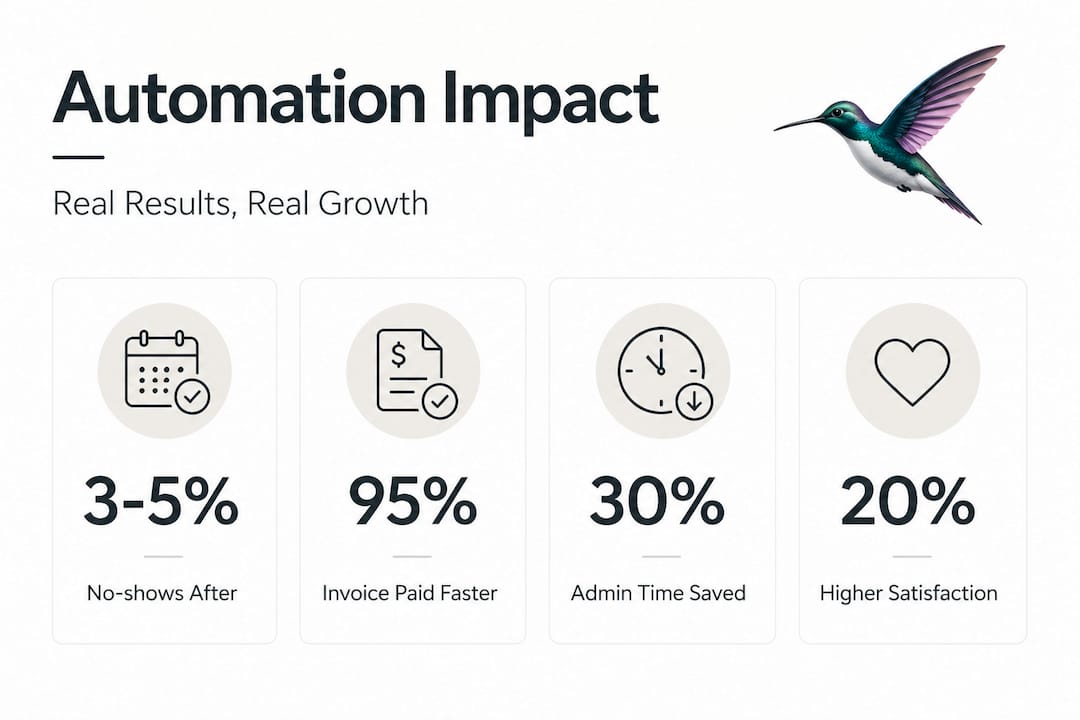
These numbers are not theoretical. They reflect what happens when home service companies stop managing their operations through spreadsheets and sticky notes.
Steps to start automating your home service operations
Understanding the practical benefits, you're likely wondering how to begin integrating automation in your business.
Automated job scheduling reduces workload for office staff and technicians alike, but only when implemented thoughtfully. Here is how to do it right:
- Audit your current processes. Write down every task your office staff and field team perform in a typical week. Highlight anything that is repetitive, time-consuming, or error-prone. These are your automation candidates.
- Set clear priorities. Do not try to automate everything at once. Pick the one or two processes causing the most pain. For most home service companies, that is scheduling and invoicing.
- Vet your tools carefully. Look for software designed for field service businesses, not generic tools repurposed for your industry. Prioritize ease of use, mobile access, customer support quality, and integration with tools you already use.
- Start with a pilot. Roll out automation to one team or one service type first. Measure results, gather staff feedback, and refine before expanding company-wide.
- Train your people properly. Even the best automation tool fails if your team does not understand or trust it. Dedicate training time before going live, not after problems appear.
- Review and refine regularly. Automation is not a set-it-and-forget-it solution. Check your metrics monthly in the first quarter and adjust workflows based on what the data tells you.
Pro Tip: Never automate a broken process. If your scheduling system is chaotic manually, automating it will just create a faster version of the same chaos. Fix the workflow logic first, then apply automation to lock in the improvements.
Why small steps in automation win for home service companies
Taking a step back, let's look at what experience across hundreds of home service businesses reveals about successful automation strategies.
Most business owners who struggle with automation made the same mistake: they tried to change everything at once. New scheduling software, new invoicing system, new CRM, new dispatch tool, all deployed in the same month. Staff were overwhelmed. Customers noticed delays. The owner blamed automation when the real problem was implementation overload.
The companies that see lasting results start with a single win. Maybe it is just the appointment reminder workflow. That one change reduces no-shows, which relieves pressure on the scheduling team, which creates mental bandwidth to tackle the next automation priority. Each small success builds staff confidence and leadership trust in the process.
There is also a culture dimension that rarely gets discussed. Automation is as much a mindset shift as a technology shift. When your team sees that an automated reminder system makes their job easier rather than threatening their role, buy-in grows naturally. That buy-in is what separates businesses where automation sticks from businesses where it gets quietly abandoned after three months.
The sharpest insight from working with home service companies of all sizes is this: the business owner who understands why they are automating a specific task always outperforms the one who just buys software because a competitor recommended it. Intention drives results.
Streamline your home service business with expert automation
Ready to see real-world impact? Here's how to make your next move toward efficient, automated home service operations.
Knowing what automation can do is one thing. Building the right system for your specific business model is another challenge entirely. The good news is you do not have to figure it out alone. Through home service automation solutions, you can access expert guidance on custom chatbots, voice AI tools, automated scheduling integrations, and content automation designed specifically for construction, landscaping, HVAC, and electrical businesses. The right partnership accelerates your results dramatically, helping you skip the costly trial-and-error phase and get directly to a system that works. Your next level of efficiency is closer than you think.
Frequently asked questions
What is the first thing to automate in a home service business?
Start by automating appointment scheduling and customer confirmations. Automated scheduling reduces no-shows and frees up staff time faster than almost any other single change.
Does automation replace staff in home service companies?
Automation reduces routine administrative workload but cannot replace skilled technicians or strong customer relationships. Automated scheduling reduces workload for office staff so they can focus on higher-value work.
Are automation systems difficult for non-tech-savvy businesses to implement?
Most modern automation tools are designed for ease of use with minimal training. Home service automation is customizable and integrates into existing workflows without requiring a technical background.
Can automation improve customer satisfaction in home services?
Absolutely. Appointment confirmations and reminders boost customer satisfaction by keeping clients informed and reducing uncertainty about their service appointments.