Marketing Automation Workflow for Home Service Businesses
Marketing Automation Workflow for Home Service Businesses ! Home service owner managing workflow at kitchen table Running a home service business means your phone is always ringing, jobs are always in the queue, and follow-up emails almost never get sent.

Running a home service business means your phone is always ringing, jobs are always in the queue, and follow-up emails almost never get sent. A marketing automation workflow fixes that. Instead of relying on memory or manual effort, automation handles the repetitive marketing tasks so you can focus on delivering great service. This guide walks you through what you need before you start, how to build your first workflows, what can go wrong, and how to measure results that actually matter for your business.
Key takeaways
| Point | Details |
|---|---|
| Start with a tech audit | Know your current lead sources and tools before building any automated marketing processes. |
| Use behavior-based triggers | Trigger emails and messages based on what customers actually do, not just time intervals. |
| Set exit conditions | Every workflow needs clear exit conditions to prevent contacts from receiving too many messages. |
| Audit workflows regularly | Review performance every 60 to 90 days to catch errors and protect your brand reputation. |
| Measure what matters | Track open rates, conversion rates, and booking requests to prove your workflow is working. |
What you need before building a marketing automation workflow
Before you build anything, you need a clear picture of where your leads come from and what happens to them after they contact you. Pull up your lead sources, whether that is your website form, Google ads, or social media. Write down every touchpoint you currently handle manually. That list is your starting point.
You also need the right technology in place. At minimum, you need three things: a CRM to store and track contacts, an email marketing platform to send automated sequences, and a scheduling or booking integration so your automation connects to actual job activity. Without those three working together, your workflows will have gaps.
Here is a quick look at tools home service businesses commonly use:
| Tool category | Example options | Approximate monthly cost |
|---|---|---|
| CRM | Jobber, HubSpot, ServiceTitan | $49 to $299 |
| Email automation | Mailchimp, ActiveCampaign, Keap | $29 to $149 |
| Scheduling integration | Housecall Pro, Acuity, Calendly | $19 to $99 |
| Workflow automation tools | Zapier, Make (formerly Integromat) | $19 to $99 |
Before you pick tools, define your customer lifecycle stages: lead, prospect, booked, active customer, past customer. Clear lifecycle definitions improve how accurately your workflows trigger and how reliable your lead nurturing becomes. Without this, you will automate the wrong messages to the wrong people.
Pro Tip: Pick one workflow to build first. The highest-impact area for most home service businesses is the post-inquiry follow-up sequence. Get that working before you add anything else.
How to build your first email marketing workflow
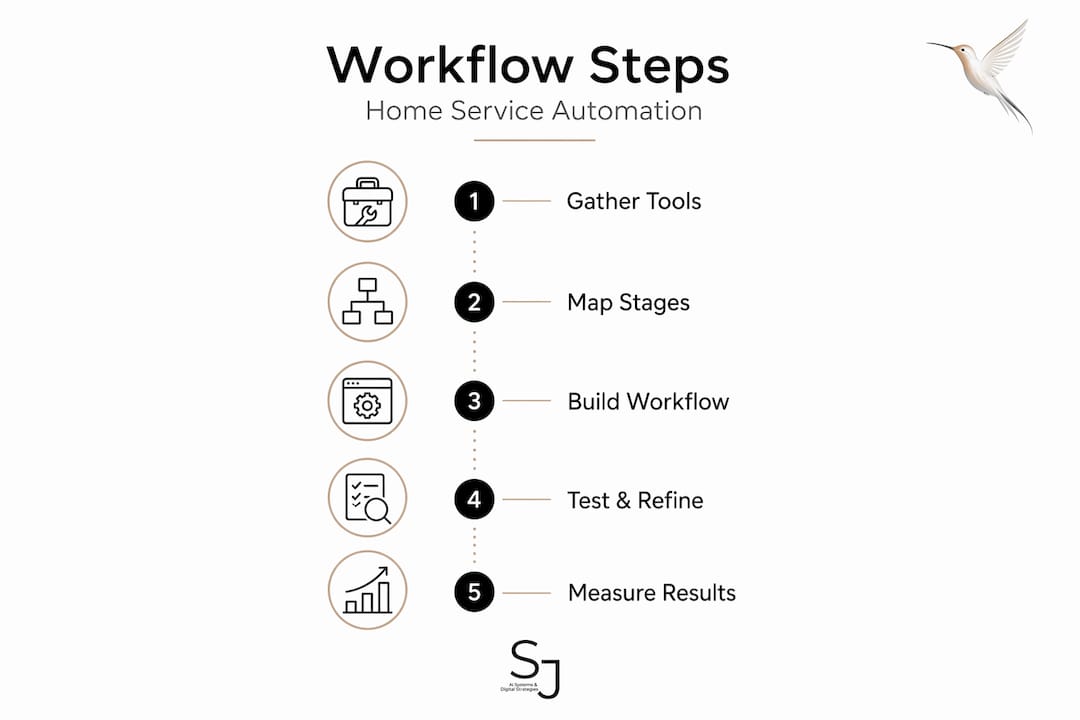
Once your tools and lifecycle stages are defined, you can start creating marketing workflows. Follow these steps:
-
Choose your trigger. A trigger is what starts the workflow. For home service businesses, strong triggers include a form submission on your website, a booking request, or a specific page visit. Behavioral triggers like these produce more relevant messages than time-based triggers alone because they respond to real intent.
-
Build your welcome sequence. The first email should go out within 5 minutes of the trigger. Introduce your business, set expectations, and offer a next step like scheduling a call or requesting a quote. Keep it short and personal in tone.
-
Design your lead nurturing sequence. This is where your digital marketing workflow does the heavy lifting. Send 3 to 5 emails over 7 to 14 days. Cover your services, a customer story, and a trust-building message like a guarantee or credential. Space these out by 2 to 3 days to avoid overwhelming your contact.
-
Add a post-job follow-up. After a job is marked complete in your CRM, trigger a follow-up sequence. Ask for a review, offer a seasonal service, or request a referral. This single step can significantly boost repeat business.
-
Set your exit conditions. Every marketing funnel automation needs exit rules. If someone books, they should exit the lead nurturing workflow immediately. Recommended exit conditions include goal completion, manual disqualification, and inactivity after 14 to 30 days. Without these, contacts will keep receiving emails after they no longer need them.
-
Test before you launch. Run a test contact through every step. Check that trigger fires correctly, emails arrive in the right order, and exit conditions work as expected.
The good news on timing: key home service workflows like inquiry follow-up and technician status updates can be set up and running in as little as 1 to 5 days.
Pro Tip: Build your highest-impact workflow first, then add complexity. A working simple workflow beats a broken complex one every time.
Common pitfalls in marketing automation workflows
The biggest mistake home service business owners make is treating automation as something you build once and never touch again. Automation failures most often come from a "set and forget" mindset. Messages go stale, logic breaks after software updates, and contacts end up in the wrong sequences.
Another common problem is double-nurturing. This happens when a current customer receives a lead nurturing email because they re-entered your funnel through a new form. To prevent this, use a three-layer suppression strategy that includes workflow exclusion lists, a global marketing contact flag in your CRM, and a dedicated customer suppression list.
Over-automating is also a real risk. Sending too many emails too fast trains contacts to ignore or unsubscribe. Frequency caps of 3 to 4 automated emails per contact per week are a proven guardrail against this.
Here is a quick troubleshooting checklist to run through when a workflow stops performing:
- Check that the trigger is still firing correctly by running a test contact through
- Confirm exit conditions are removing contacts who have already converted
- Review email open rates to spot subject lines that need refreshing
- Look for logic errors where contacts branch into the wrong sequence
- Verify your suppression lists are updated and connected
Catch branches in your workflow are also worth adding. These are fallback paths for contacts who do not fit your standard logic, preventing them from falling through the gaps entirely.
Pro Tip: Assign one person in your business as the workflow owner. This person is responsible for reviewing results and catching problems before they damage customer relationships.
Measuring success and refining your workflows
You cannot improve what you do not measure. For a marketing automation workflow in a home service business, the numbers that matter most are open rates, click-through rates, conversion rates, and booking requests generated per workflow.

Here are benchmarks to use as a starting point:
| Metric | Industry benchmark | What to aim for |
|---|---|---|
| Email open rate | 20 to 30% | 35%+ with personalization |
| Click-through rate | 2 to 5% | 6 to 8% with behavior targeting |
| Lead to booking conversion | 10 to 20% | 25%+ with follow-up sequence |
| Review request response | 5 to 10% | 15%+ with timing optimization |
AI-powered automation workflows can increase conversion rates by 40 to 65% when built correctly, with behavioral email sequences and dynamic segmentation doing most of the work. That is not a number to ignore.
Run a performance audit every 60 to 90 days. Look at which emails get ignored, which sequences produce bookings, and where contacts drop off. Then test one change at a time, a different subject line, a new send time, or a shorter message. Small experiments compound into meaningful improvements over months.
Pro Tip: Use UTM parameters on any links in your automated emails. This connects your email activity to actual website behavior in Google Analytics and shows you which workflows drive real traffic.
My honest take on marketing automation for home services
I have worked with enough home service businesses to say this plainly: most of them automate too much too fast, then wonder why results disappoint. The businesses that see real ROI from a marketing automation workflow start small and stay disciplined.
What I have learned is that advertising automation for home services works best when it is built around what customers actually do, not what you hope they will do. A homeowner who visits your pricing page twice in three days is a completely different lead than someone who opened your welcome email once. Your workflow should treat them differently.
The other truth nobody talks about enough is that automation reflects your brand. A clunky, generic email sequence tells your customer exactly how much you care about them. Home service businesses win on trust and reputation. Your automated messages need to sound like a real person who knows the customer, not a blast campaign designed for volume.
I also see owners skip the audit step consistently. Workflow audits every 60 to 90 days are not optional maintenance. They are the work that keeps automation profitable and on-brand over time.
— Sharon
Ready to build workflows that actually work for your business?
At Sharonjerman, we work specifically with home service businesses on digital strategy and marketing automation. If you have been trying to figure out where to start with your email marketing workflow or CRM automation strategies, the Sharonjerman home services solutions page is where to begin. You will find information on custom marketing automation setups, chatbot integration, and consulting designed for businesses like yours. For a closer look at how automation fits into your overall digital marketing workflow, the chatbot guide for home services is a strong next read. Automation should build your business, not create more work.
FAQ
What is a marketing automation workflow?
A marketing automation workflow is a series of automated actions, usually emails or CRM updates, triggered by a customer behavior or event. For home service businesses, common triggers include form submissions, booking requests, or job completion.
How long does it take to set up automation workflows?
Basic home service workflows like inquiry follow-up and technician status updates can be set up in 1 to 5 days once your tools are connected.
How do I stop sending emails to existing customers?
Use a three-layer suppression setup: add current customers to a workflow exclusion list, flag them in your CRM, and maintain a customer suppression list. This prevents double-nurturing existing contacts who have already converted.
How often should I review my workflows?
Audit every 60 to 90 days. Check trigger accuracy, exit conditions, open rates, and conversion data to catch problems before they affect your customer relationships or brand reputation.
What triggers work best for home service businesses?
Behavior-based triggers outperform time-based ones. The most effective options are form submissions, pricing page visits, and booking confirmations, because they signal real intent from the customer.